HVAC maintenance agreement software that only handles the agreement
This is HVAC maintenance agreement software for companies that already run a job system. Two things come first. Every member signs a digital service agreement, and the signed copy is stored on their customer record. And the dashboard shows the monthly recurring revenue your plan book brings in, worked out from your active memberships each time you open it. Quoting, dispatch and the work itself stay where they are.
No credit card required.
See it in two minutes
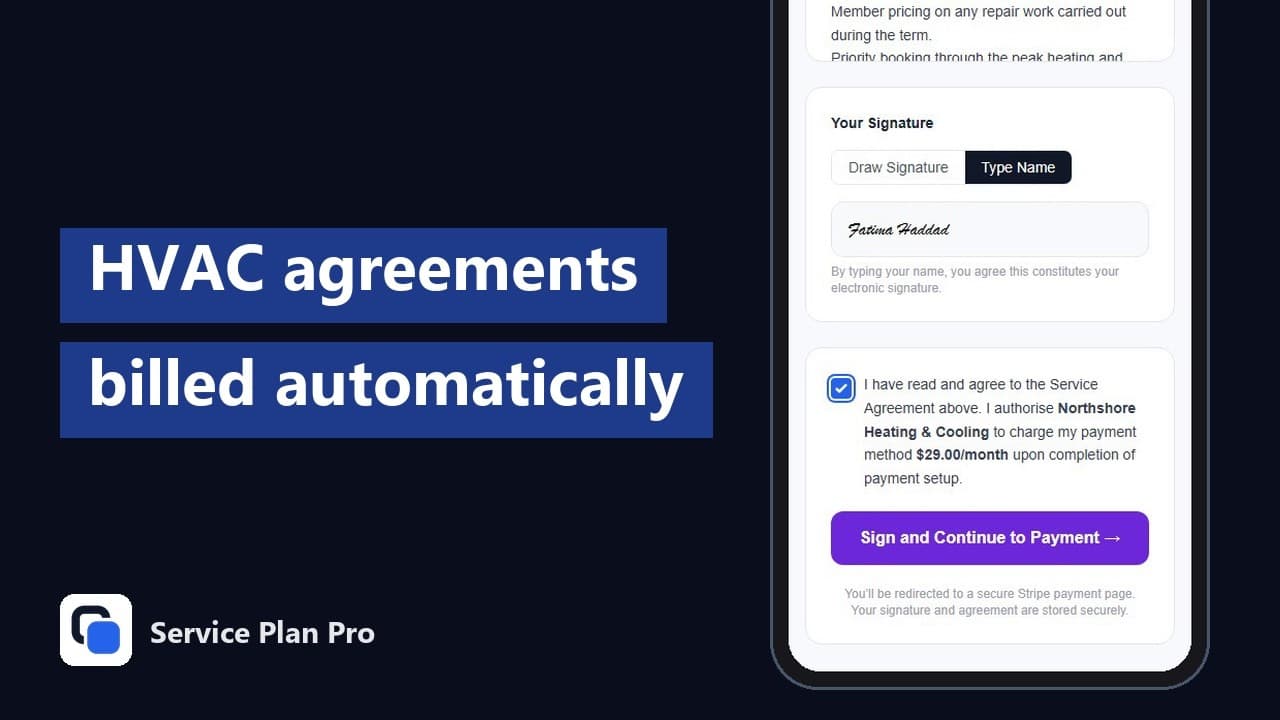
What an HVAC maintenance agreement looks like in Service Plan Pro
An agreement is a plan. You give it a name, a price, a billing interval of monthly or yearly, and a visit frequency for the tune-ups it includes: annual, twice a year or quarterly. Add the perks you want on it, like priority booking or a parts discount. The HVAC template pre-fills all of that, so you're editing a plan instead of starting from a blank page.
Before billing starts, the customer signs a digital service agreement that lists the plan, the price and the perks. They can sign from a link on their phone or on your tablet in person, with a typed or drawn signature. The wording comes from a template you edit under Settings, and the signed copy stays on the customer record, including after a cancellation.
Then the agreement collects on its own. Card-billed plans charge the member's card through your own Stripe account on each renewal date and send the receipt, and the money lands in your account. If some members would rather pay by bank transfer or cash, a recurring invoice plan emails a branded invoice on the schedule you set instead, with an optional Pay Now link.
HVAC membership software for the recurring side
In HVAC the same thing gets sold as a maintenance agreement, a membership, a club or a comfort plan. It's one product with different names on the front. If you're shopping for HVAC membership software, what you're after is what's above: a price, a set of visits, perks the member can point to, and a card that gets charged without anyone chasing it.
So call it whatever your customers already know. The plan name, the perks and the agreement wording are yours, and the member portal shows each member their plan, perks, visits and billing under that name. For a membership program you promote on your website, in an email or after a service call, a shareable enrolment link lets the customer pick the plan, fill in their details, sign and enter a card without anyone on your team stepping in.
Existing customers come across from a CSV, an Excel file or Google Sheets, and you can enrol them in bulk on any plan. Each one still gets their own agreement to sign.
Spring and fall tune-ups on a calendar you can trust
The visit schedule is worked out from the enrolment date at the frequency on the plan, so a member who signs up for a twice-a-year plan in spring comes due again in the fall. Every visit shows on the Schedule page in your dashboard, and you mark it complete when it's done.
Download the whole schedule as a calendar file and it opens in Google Calendar, Apple Calendar or Outlook, so whoever books the work can see the spring and fall rush building before it arrives. Each morning you get an email listing tomorrow's visits, and members get their own reminders ahead of their tune-up.
If you run ServiceM8, each due visit also becomes an unassigned job card on the dispatch board with the plan name and perks on it. Without it, the calendar file is how the visits reach whatever you book jobs in.
Failed cards, renewals and price changes
When a card charge fails, Stripe retries it automatically over several days. The member gets an email asking them to update their card in the customer portal, and the membership shows as past due in your dashboard and under At-Risk Customers, beside the revenue at risk. If every retry fails, the subscription is cancelled and you're told. The agreement, the payment history and the visit records all stay, and a win-back email goes to the member a few days later.
Renewals don't need you. Members get a renewal reminder email before the date, and the agreement renews on the same terms until it's cancelled. A recurring invoice that goes unpaid past the number of days you set gets an overdue reminder automatically, with an optional second reminder per plan.
Price changes are deliberate. Editing a plan changes it for new enrolments, and members already on it keep the price and details they signed up to. To move existing members onto a new price, set up the new plan and use bulk plan change on Growth or Pro: each member's current subscription is cancelled straight away and they're emailed a payment link for the new plan, which starts when they pay.
What it costs
Starter is $29 USD a month for up to 100 active subscriptions. Growth is $59 USD a month for up to 500, and adds SMS notifications, churn tracking, the cash-collected chart and bulk plan changes. Pro is $99 USD a month for up to 5,000 active subscriptions, with a white-label customer portal and advanced reporting. Enterprise: More than 5,000? Talk to us.
Every plan includes the signed agreements, card billing and recurring invoices, the visit schedule, failed payment recovery, the member portal, the headline MRR on the dashboard and both connectors. There's a 14-day free trial with no credit card, and no platform fee on your members' payments: you pay Stripe's standard processing fee and the rest is yours. The full breakdown is in the pricing section.
Works beside the job system you already run
Service Plan Pro doesn't quote, dispatch or track technicians. It runs on its own with no field service app behind it, and connects to two tools when you want it to. Both are optional connectors, and both come with every plan.
Connect ServiceM8 and each due visit becomes a job card, your client list syncs across, and every successful payment is logged to the client diary. Connect QuickBooks Online and paid invoices, their payments and your Stripe payouts are posted to your books once a day, so nobody re-keys them. Each payout lands as one deposit with the fee on its own line.
Running something else? Bring your customers in from a spreadsheet, send the visit schedule to your calendar, and keep booking the work the way you do now. The service agreement billing page covers the same mechanics for every trade, and plumbing maintenance agreements covers them for the plumbing side of a combined HVAC and plumbing company. Companies that also pull permits on panels and generators can read electrical service agreement software for the same mechanics under electrical vocabulary, and home service companies that add a pest route can read pest control service agreement software.
HVAC maintenance agreements, answered
How much should I charge for an HVAC maintenance plan?
Start from the visits. Take what you'd charge for the tune-ups the plan includes, take a little off for the commitment, and spread what's left across the billing interval. Then see what that price does across your whole customer list with the maintenance plan revenue calculator, which turns a price and a visit frequency into what the program would earn over a year.
Do I have to replace my field service software?
No. Service Plan Pro is HVAC service agreement software for the agreement, the billing and the visit schedule, and your job system keeps the quoting, dispatch and invoicing for one-off work. You can run both from the start, and nothing in the job system has to change.
Can members pay yearly instead of monthly?
Yes. Card-billed plans charge monthly or yearly through your own Stripe account, and you set the price for each. Recurring invoice plans go out on whatever schedule you choose, and the member pays each one by bank transfer, cash or the Pay Now link.
Can I use my own agreement wording?
Yes, on every plan. Edit the agreement template under Settings and every new agreement uses it, with the plan name, price and perks filled in for each member. The signed copy is stored on the customer record and stays there after a cancellation. If you don't have wording yet, start from the free HVAC service agreement template.
No credit card required, and your job system stays where it is.