How to bill recurring service agreements with Service Plan Pro
Plans, enrolment, billing and payments, tax, and the optional connectors, in the order you will meet them.
Getting Started
Watch the walkthrough
Three minutes covering the whole flow: building a plan, enrolling a customer, the payment going through, and the job card appearing in ServiceM8. Everything below is the written version of the same ground.
What is Service Plan Pro?
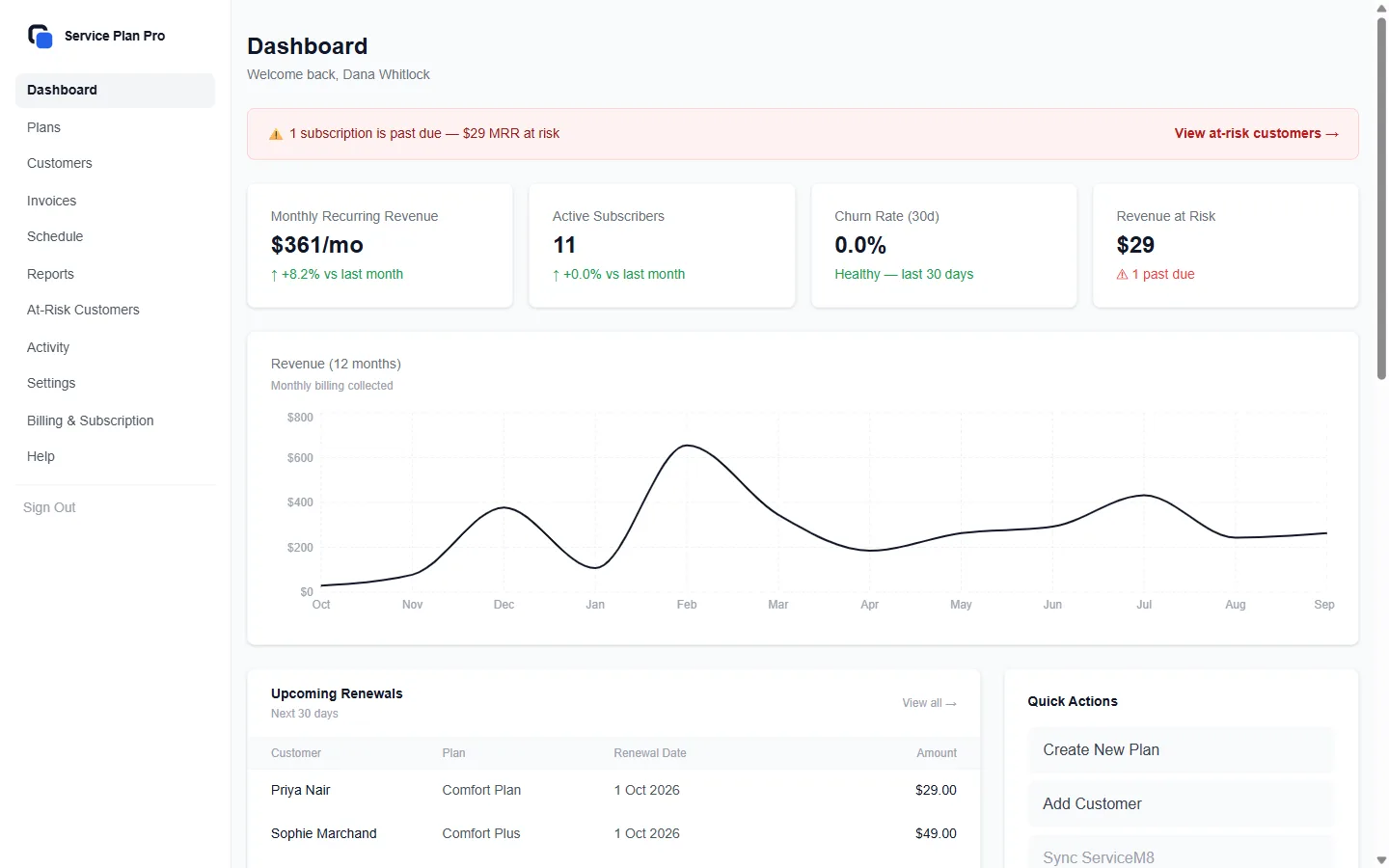
Service Plan Pro lets field service companies sell recurring service agreements and bill them. You set up a plan once, enrol your customers, and the platform handles the billing: through Stripe for customers with a card on file, or through scheduled invoice emails for customers who prefer to pay by bank transfer or manually. Each customer signs a digital service agreement before billing starts. Plans that include visits get a visit schedule of their own, with reminders for you and for the customer.
ServiceM8 is an optional connector. Connect it and Service Plan Pro will also create job cards for scheduled visits, sync your client list, and log payment notes to client diaries. Nothing else requires it.
Step 1: Create your first service plan
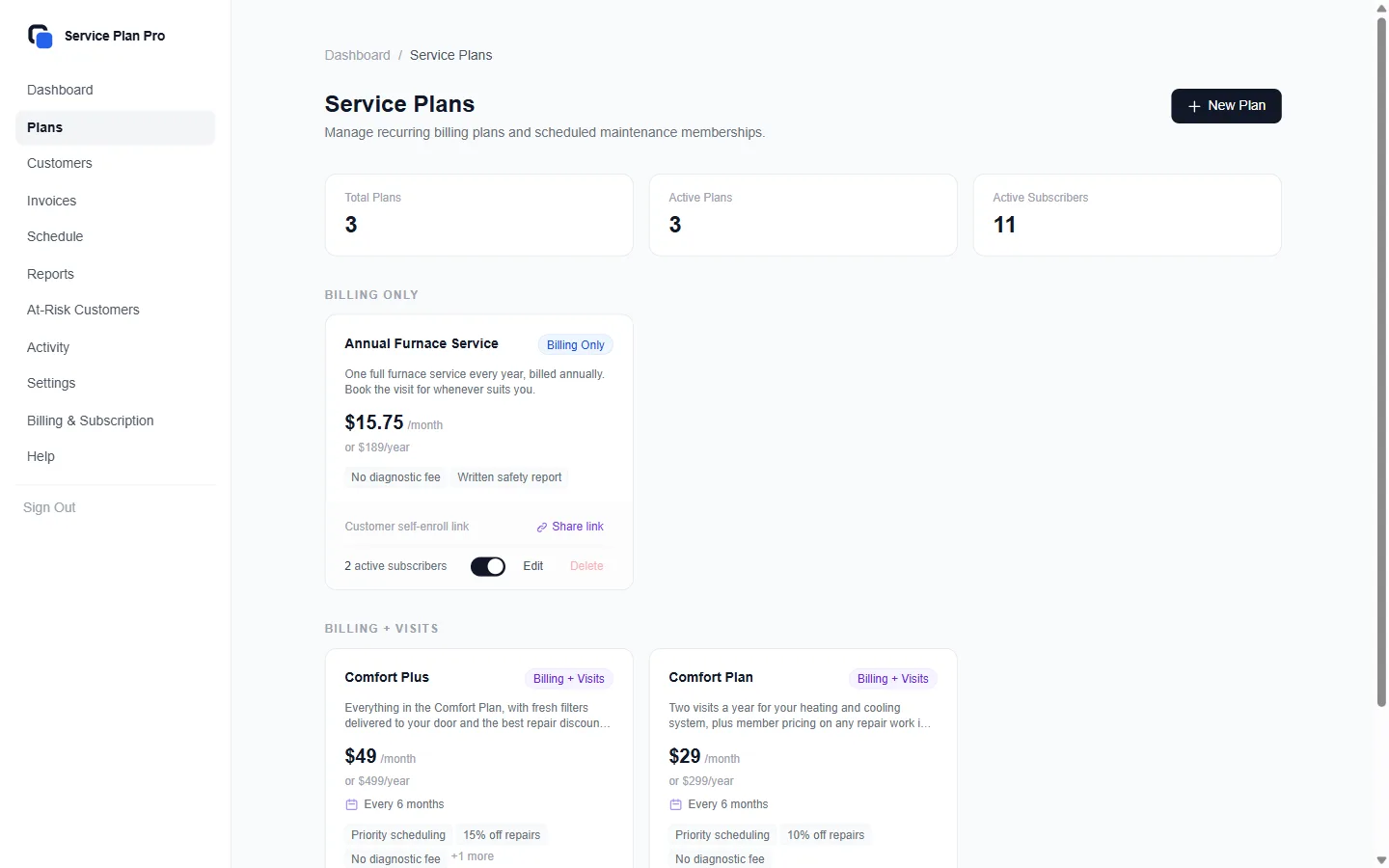
- ●Navigate to Plans in the dashboard and click "Create New Plan".
- ●Choose a plan type: Billing Only (auto-charge, no visits), Billing + Visits (auto-charge with a visit schedule), or Recurring Invoice (send invoices on a schedule, no card required).
- ●Set your price, billing interval (monthly or yearly), and add member perks.
- ●Save the plan. It is now ready for customers to enrol.
- ●Use a template to get started quickly: the plan builder includes ready-made plan templates that work for any trade, plus quick-add perk sets for HVAC, pest control and pool.
Step 2: Add your first customer
- ●Go to Customers and click "Add Customer" to enter one customer by hand.
- ●Or click "Import" to bring in a whole list: upload an Excel or CSV file, or, under "Other ways" on the Import page, paste from a spreadsheet or import from Google Sheets. You map your columns to Service Plan Pro fields before anything is saved.
Step 3: Enrol the customer
- ●Open the customer's profile and click "Enrol in Plan".
- ●Select the plan and confirm. A card plan asks for monthly or yearly; a Recurring Invoice plan asks for the first invoice date.
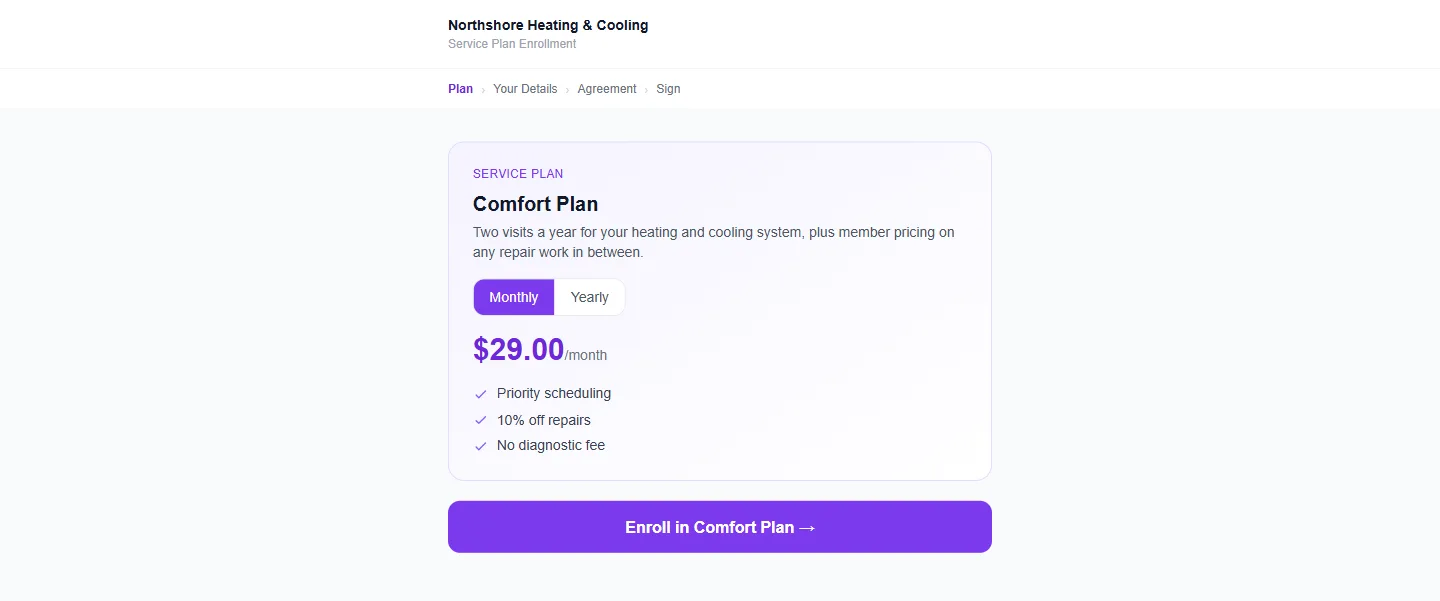
- ●Card plans (Billing Only, Billing + Visits) gate billing on the signature when the customer signs through a signing link or your shared enrolment link: they sign first, then pay, and billing starts then. Enrolling them yourself sends a payment link instead, and you can send the agreement from their profile afterwards.
- ●Recurring Invoice plans do not wait for the signature. The welcome email carries the agreement link, the invoices go out on their schedule either way, and the profile shows whether it is signed.
- ●From here on, invoices, card charges, receipts, and reminders run on their own.
Step 4 (optional): Connect a field service app
ServiceM8 is the one connector available today. Connecting it is optional; every step above works without it.
- ●Go to Settings in your dashboard and click "Connect ServiceM8".
- ●You'll be redirected to ServiceM8 to authorise the connection.
- ●Once authorised, you'll return to Service Plan Pro ready to go.
- ●You can reconnect at any time from Settings. To revoke access, disable Service Plan Pro in the ServiceM8 Add-on Store; we're notified, your subscriptions are paused and your data is kept.
Plan tiers overview
Starter: $29 USD/month
- ●Up to 100 active subscriptions
- ●All three plan types (billing-only, billing + visits, recurring invoice)
- ●Service plan builder with templates
- ●Digital service agreements with e-signature
- ●Custom service agreement templates
- ●ServiceM8 and QuickBooks Online connectors
- ●Customer import (Excel, CSV, Google Sheets, ServiceM8 sync)
- ●Bulk enrollment
- ●Shareable enrollment links
- ●Customer self-service portal
- ●Failed payment recovery (retries, reminder emails, at-risk list)
- ●Email notifications + basic dashboard
- ●100 SMS a month included, then $0.05 per text
- ●Renewal reminder emails
- ●Win-back email for cancelled members
Growth: $59 USD/month
- ●Up to 500 active subscriptions
- ●SMS notifications
- ●500 SMS a month included, then $0.05 per text
- ●Churn tracking, 12-month cash-collected chart, full activity history
- ●Bulk plan changes and cancellations
Pro: $99 USD/month
- ●Up to 5,000 active subscriptions
- ●1,500 SMS a month included, then $0.05 per text
- ●White-label customer portal
- ●Advanced reporting + CSV export
- ●Priority support
Enterprise
More than 5,000? Talk to usStill have questions? Contact Support
Getting Started
Watch the walkthrough
Three minutes covering the whole flow: building a plan, enrolling a customer, the payment going through, and the job card appearing in ServiceM8. Everything below is the written version of the same ground.
What is Service Plan Pro?
Service Plan Pro lets field service companies sell recurring service agreements and bill them. You set up a plan once, enrol your customers, and the platform handles the billing: through Stripe for customers with a card on file, or through scheduled invoice emails for customers who prefer to pay by bank transfer or manually. Each customer signs a digital service agreement before billing starts. Plans that include visits get a visit schedule of their own, with reminders for you and for the customer.
ServiceM8 is an optional connector. Connect it and Service Plan Pro will also create job cards for scheduled visits, sync your client list, and log payment notes to client diaries. Nothing else requires it.
Step 1: Create your first service plan
- ●Navigate to Plans in the dashboard and click "Create New Plan".
- ●Choose a plan type: Billing Only (auto-charge, no visits), Billing + Visits (auto-charge with a visit schedule), or Recurring Invoice (send invoices on a schedule, no card required).
- ●Set your price, billing interval (monthly or yearly), and add member perks.
- ●Save the plan. It is now ready for customers to enrol.
- ●Use a template to get started quickly: the plan builder includes ready-made plan templates that work for any trade, plus quick-add perk sets for HVAC, pest control and pool.
Step 2: Add your first customer
- ●Go to Customers and click "Add Customer" to enter one customer by hand.
- ●Or click "Import" to bring in a whole list: upload an Excel or CSV file, or, under "Other ways" on the Import page, paste from a spreadsheet or import from Google Sheets. You map your columns to Service Plan Pro fields before anything is saved.
Step 3: Enrol the customer
- ●Open the customer's profile and click "Enrol in Plan".
- ●Select the plan and confirm. A card plan asks for monthly or yearly; a Recurring Invoice plan asks for the first invoice date.
- ●Card plans (Billing Only, Billing + Visits) gate billing on the signature when the customer signs through a signing link or your shared enrolment link: they sign first, then pay, and billing starts then. Enrolling them yourself sends a payment link instead, and you can send the agreement from their profile afterwards.
- ●Recurring Invoice plans do not wait for the signature. The welcome email carries the agreement link, the invoices go out on their schedule either way, and the profile shows whether it is signed.
- ●From here on, invoices, card charges, receipts, and reminders run on their own.
Step 4 (optional): Connect a field service app
ServiceM8 is the one connector available today. Connecting it is optional; every step above works without it.
- ●Go to Settings in your dashboard and click "Connect ServiceM8".
- ●You'll be redirected to ServiceM8 to authorise the connection.
- ●Once authorised, you'll return to Service Plan Pro ready to go.
- ●You can reconnect at any time from Settings. To revoke access, disable Service Plan Pro in the ServiceM8 Add-on Store; we're notified, your subscriptions are paused and your data is kept.
Plan tiers overview
Starter: $29 USD/month
- ●Up to 100 active subscriptions
- ●All three plan types (billing-only, billing + visits, recurring invoice)
- ●Service plan builder with templates
- ●Digital service agreements with e-signature
- ●Custom service agreement templates
- ●ServiceM8 and QuickBooks Online connectors
- ●Customer import (Excel, CSV, Google Sheets, ServiceM8 sync)
- ●Bulk enrollment
- ●Shareable enrollment links
- ●Customer self-service portal
- ●Failed payment recovery (retries, reminder emails, at-risk list)
- ●Email notifications + basic dashboard
- ●100 SMS a month included, then $0.05 per text
- ●Renewal reminder emails
- ●Win-back email for cancelled members
Growth: $59 USD/month
- ●Up to 500 active subscriptions
- ●SMS notifications
- ●500 SMS a month included, then $0.05 per text
- ●Churn tracking, 12-month cash-collected chart, full activity history
- ●Bulk plan changes and cancellations
Pro: $99 USD/month
- ●Up to 5,000 active subscriptions
- ●1,500 SMS a month included, then $0.05 per text
- ●White-label customer portal
- ●Advanced reporting + CSV export
- ●Priority support
Enterprise
More than 5,000? Talk to usStill have questions? Contact Support
Service Plans
Billing Only
Use this for plans where you charge a recurring fee but don't schedule periodic site visits. Examples include monitoring plans, warranty extensions, or priority call-out memberships. Stripe handles billing automatically. No job cards are created in ServiceM8 unless there's a customer-initiated service call.
Billing + Visits
Use this for plans that include scheduled visits (e.g. annual HVAC service, quarterly pest control). You set the visit frequency when creating the plan and Service Plan Pro works out each visit date from the customer's enrolment date.
Each visit appears on the Schedule page in your dashboard. You mark it complete once it is done, and you can download the whole schedule as a calendar (.ics) file for Google Calendar, Apple Calendar, or Outlook. Every morning at 09:00 in your business timezone (set under Settings) you get a visit digest email listing tomorrow's visits, and customers get their own visit reminders.
With ServiceM8 connected, Service Plan Pro also creates a job card in ServiceM8 when each visit is due, and you dispatch it from there.
Recurring Invoice
Use this for customers who prefer not to put a card on file: for example, customers who pay by bank transfer, direct debit, or cash. Instead of auto-charging via Stripe, Service Plan Pro sends a branded invoice email to the customer on a recurring schedule: weekly, fortnightly, monthly, quarterly, every 6 months or annually. (Billing Only and Billing + Visits plans are charged monthly or yearly.)
Each invoice optionally includes a Stripe “Pay Now” link so customers can pay by card on that specific invoice if they choose, but they are never locked into automatic charges.
The business owner marks invoices as paid manually, or the system detects payment via the Stripe Payment Link. Overdue reminders are sent automatically based on your settings. With ServiceM8 connected, payment confirmations are also logged to the client diary.
Use Recurring Invoice plans when:
- ●Customers have long-term relationships and pay by bank transfer
- ●You operate in markets where direct debit or cash is common (Australia, UK)
- ●You want to start managing recurring revenue without the Stripe conversation
How to create and edit plans
- ●Go to Plans → Create New Plan.
- ●Choose Billing Only, Billing + Visits, or Recurring Invoice, and set your price. Card plans are billed monthly or yearly; a Recurring Invoice plan has its own invoice frequency.
- ●For Billing + Visits, specify the visit frequency (e.g. "every 6 months").
- ●Add member perks. These appear in the service agreement, the customer portal, and, if ServiceM8 is connected, the job cards.
- ●To edit an existing plan, click the plan card and choose Edit. Changes apply to new enrollments; existing subscriptions keep their original plan details.
Member perks
Perks are the named benefits included in a plan (e.g. "Priority booking", "10% discount on parts"). You add them when creating or editing a plan. They are shown in:
- ●Digital service agreements: the perk list appears in the agreement the customer signs.
- ●Customer portal: members see their perks under "My Plan".
- ●ServiceM8 job cards, if ServiceM8 is connected. The job description includes the plan name and perks so your technicians know the customer is a member.
How Recurring Invoice plans work
- ●When a customer is enrolled in a Recurring Invoice plan, Service Plan Pro generates and emails a branded invoice on your chosen schedule (e.g. the 1st of each month).
- ●Each invoice includes the plan name, amount due, due date, and optionally a Stripe "Pay Now" link.
- ●Each invoice is due a set number of days after it is sent: set the default under Settings → Invoices.
- ●If the invoice is still unpaid 7 days after its due date, an overdue reminder is sent automatically. A second reminder can follow 14 days after the due date for customers you switch it on for when you enrol them.
- ●To turn either reminder off for the whole business, use Settings → Notifications → Recurring Invoices.
- ●When payment is received, mark the invoice as paid from Dashboard → Invoices, or it is marked automatically if the customer pays via the Stripe Payment Link.
- ●If ServiceM8 is connected, a payment confirmation note is logged to the customer's client diary automatically.
- ●You can view all outstanding invoices, overdue invoices, and payment history from Dashboard → Invoices.
- ●To move a customer to a different Recurring Invoice plan, open their page and click "Change plan". For several at once (Growth and Pro, with Stripe connected), select them on Customers, click "More Actions", then "Change Plan". Only Recurring Invoice plans are offered: a customer who pays by invoice cannot be moved onto a card plan this way.
- ●The change takes effect from the customer's next invoice: that invoice, and every one after it, carries the new plan's name and price. The next invoice date stays the same, and if the new plan's frequency is different, it applies to the invoices after that one.
- ●Invoices already sent are unchanged, and nothing is prorated or charged straight away. If the customer pays through a Stripe "Pay Now" link, they get a new link for the new amount; the old link still pays the invoices it was sent with.
Plan templates
The plan builder includes starter templates for common trade plan types. Select a template to pre-fill the plan name, pricing, visit frequency, and default perks. You can customise everything before saving.
For how these plan types add up to maintenance contract billing for a field service company, see that page.
Still have questions? Contact Support
Enrolling Customers
Manual enrollment
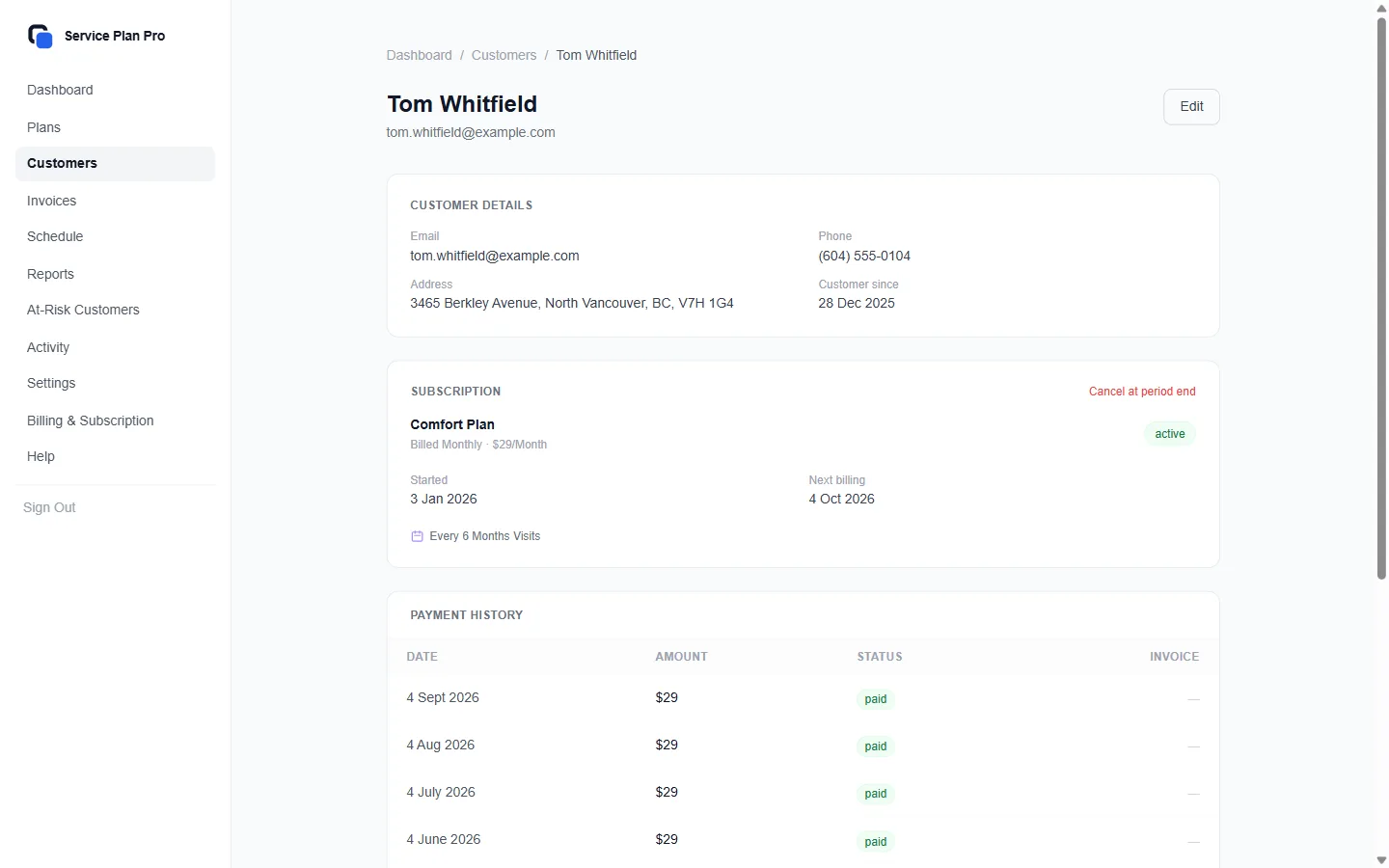
- ●Go to Customers and find the customer you want to enrol.
- ●Open their profile and click "Enrol in Plan".
- ●Select the plan and confirm.
- ●Card plan: the customer is emailed a payment link, and Stripe billing starts when they pay.
- ●Recurring Invoice plan: the customer gets a welcome email with the agreement to sign, if the Welcome email is on under Settings → Notifications. Invoices go out on schedule whether or not it is signed.
- ●Either way, the Agreement box on their profile shows Signed with a View button, or Not signed with the date the link went, Copy link and Resend.
Bulk enrollment after import
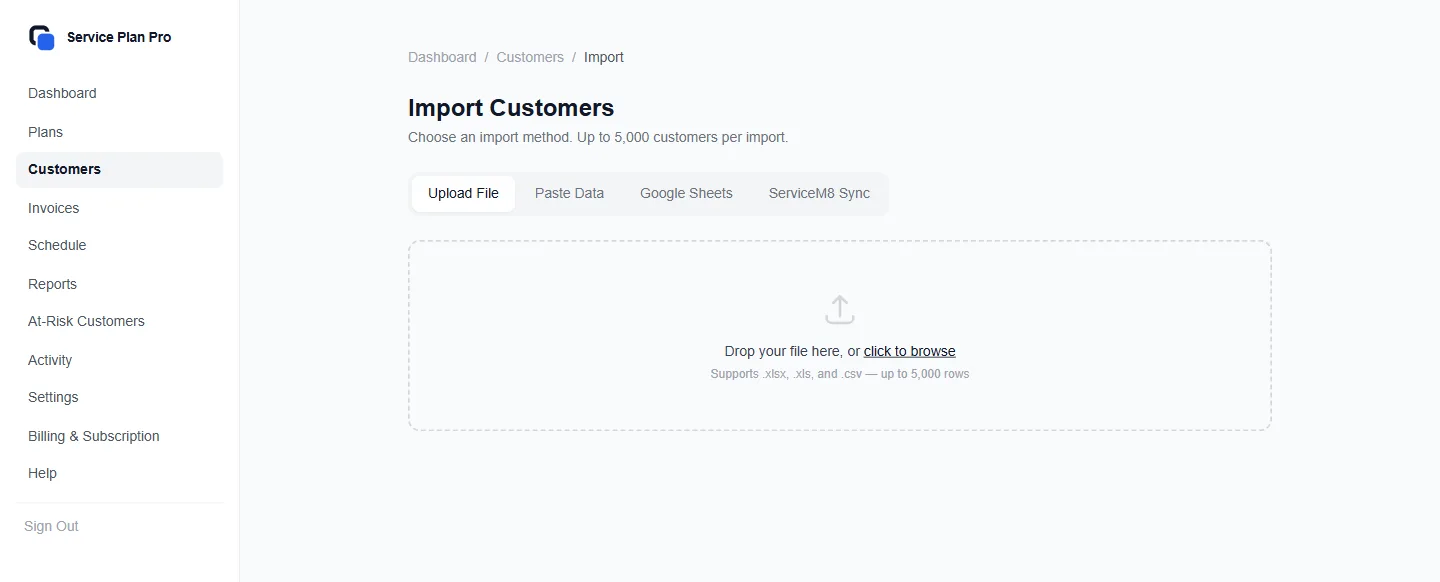
If you've imported customers via CSV, Excel, or the ServiceM8 sync, you can enrol multiple customers at once:
- ●Right after an import, the import screen's second step, "Enroll these customers", enrols everyone the file named: pick a plan (and, for a Recurring Invoice plan, the first invoice date).
- ●For a Recurring Invoice plan the file can carry a "First invoice date" column, so each customer keeps their own renewal date. Write dates as 2026-03-01 (a real Excel date cell and "1 March 2026" are read too); a date like 3/1/2026 that could be read two ways is refused, not guessed.
- ●A blank cell takes the date you pick on the enrol step. A date before today is refused: enter each customer's next invoice date, not their last one.
- ●At any other time, go to Customers, tick the customers you want, and press Enroll in Plan. For a Recurring Invoice plan you pick one first invoice date for the selection: today emails each customer their first invoice straight away, a later date sends it that morning.
- ●On a card plan each customer is emailed a payment link, and their billing starts when they pay.
- ●Customers already on a plan, or with no email address, are skipped, and the screen says how many.
Shareable enrollment links
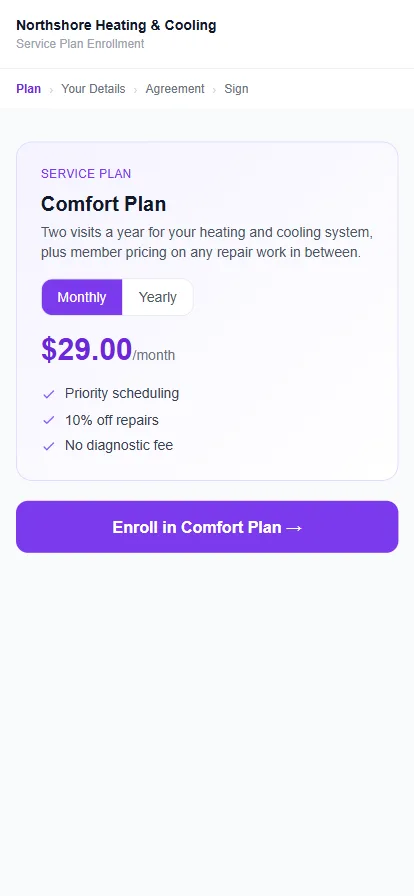
You can generate a public enrollment link for any plan. Share it via email, SMS, or your website. Customers click the link, fill in their details, sign the agreement, and enter their payment method, all without you needing to do anything manually.
- ●Go to Plans and click "Share" on the plan you want to share.
- ●Copy the link or embed it on your website.
- ●Enrollments appear in your dashboard in real time.
How the digital service agreement works
- ●Service Plan Pro generates a secure signing link for you to share with the customer, or open on your own device for in-person signing. On a Recurring Invoice plan it is emailed with the welcome email when you enrol them.
- ●The customer opens the link, reads the agreement, and signs with a typed or drawn signature.
- ●The signed agreement is stored against the customer record, in the Agreement box on their profile.
- ●On a card plan the link leads on to payment, and billing starts only after it is signed and paid. On a Recurring Invoice plan signing takes no payment and billing does not wait for it.
- ●You can customise the agreement template under Settings → Agreements.
Still have questions? Contact Support
Field service connectors (ServiceM8)
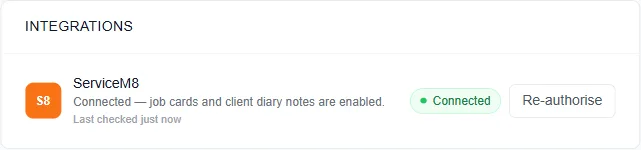
Connecting a field service app is optional: Service Plan Pro bills, schedules, and reminds on its own, and ServiceM8 is the one connector available today. Everything below describes what changes when it is connected. For pricing and the plan-level view, see the ServiceM8 connector page.
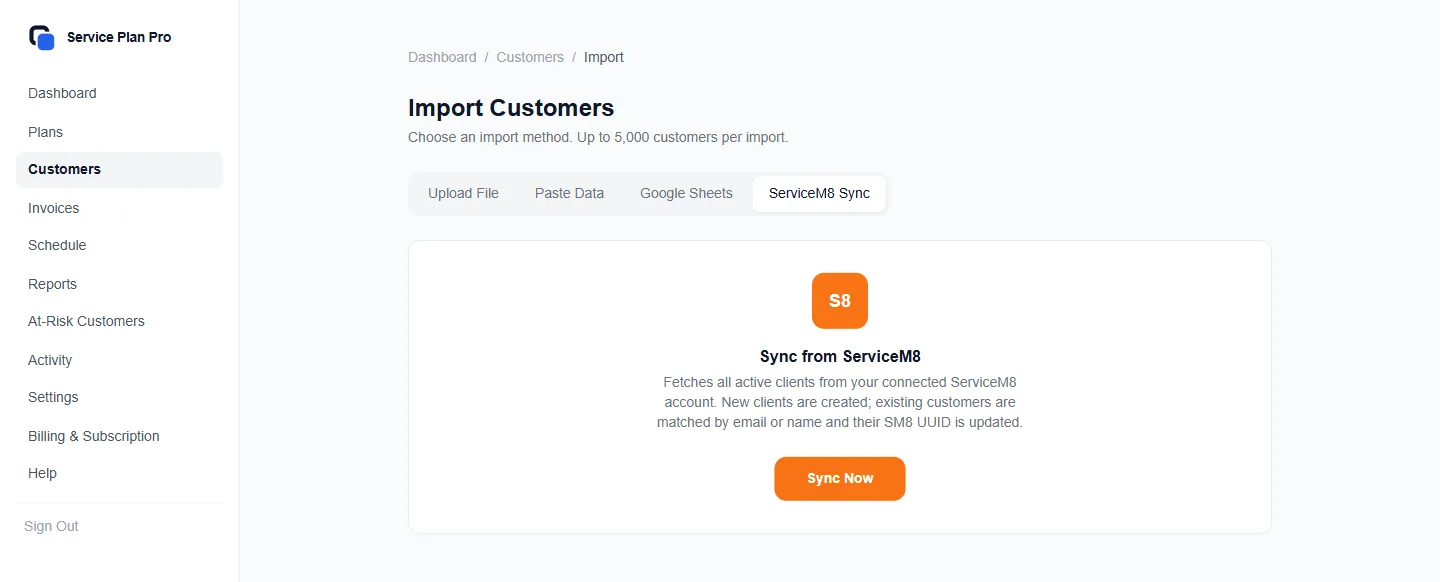
How job cards are auto-created for Billing + Visits plans
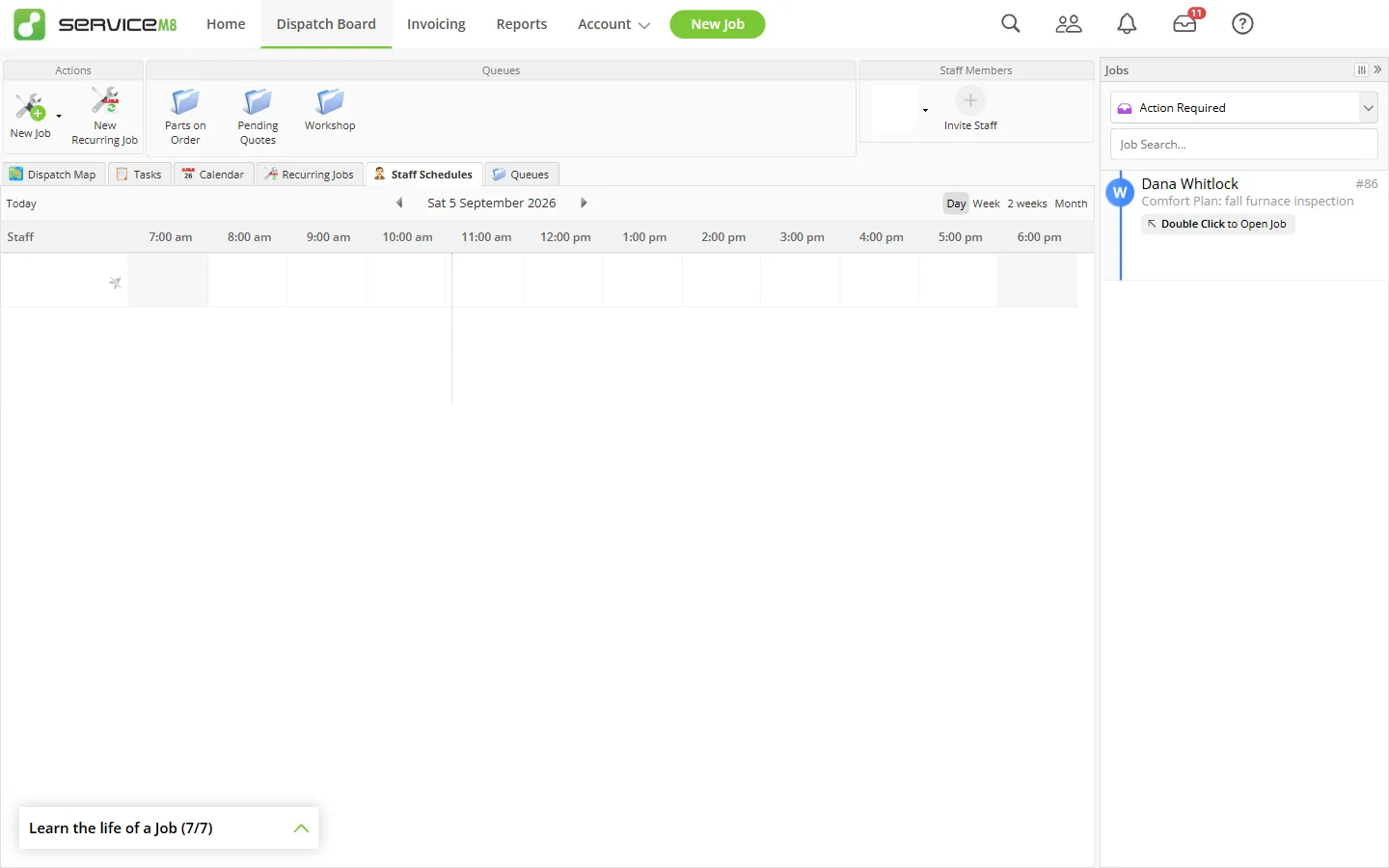
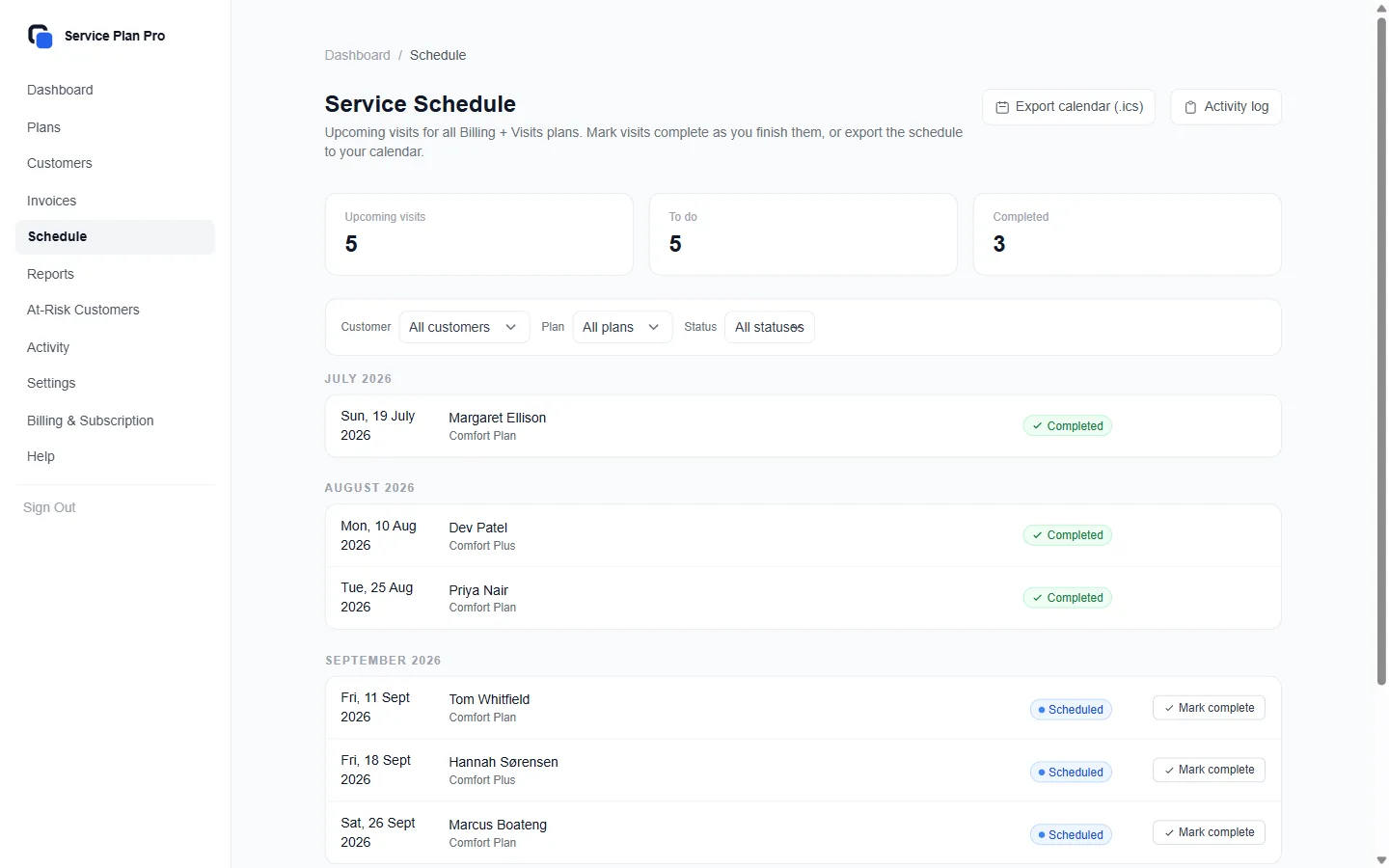
For Billing + Visits plans, Service Plan Pro calculates the next visit date based on the plan's visit frequency and the customer's enrollment date. Without a connector, each visit appears on the Schedule page in your dashboard, you mark it complete once it is done, you can download the schedule as a calendar (.ics) file, and it appears in your morning visit digest, sent at 09:00 in your business timezone.
With ServiceM8 connected, when the visit date arrives a job card is also created in ServiceM8 automatically with:
- ●The customer's name and address from their profile.
- ●A job description that includes the plan name and member perks.
- ●Status set to "Work Order" so it appears in your dispatch board.
How payment notes are logged to the SM8 client diary
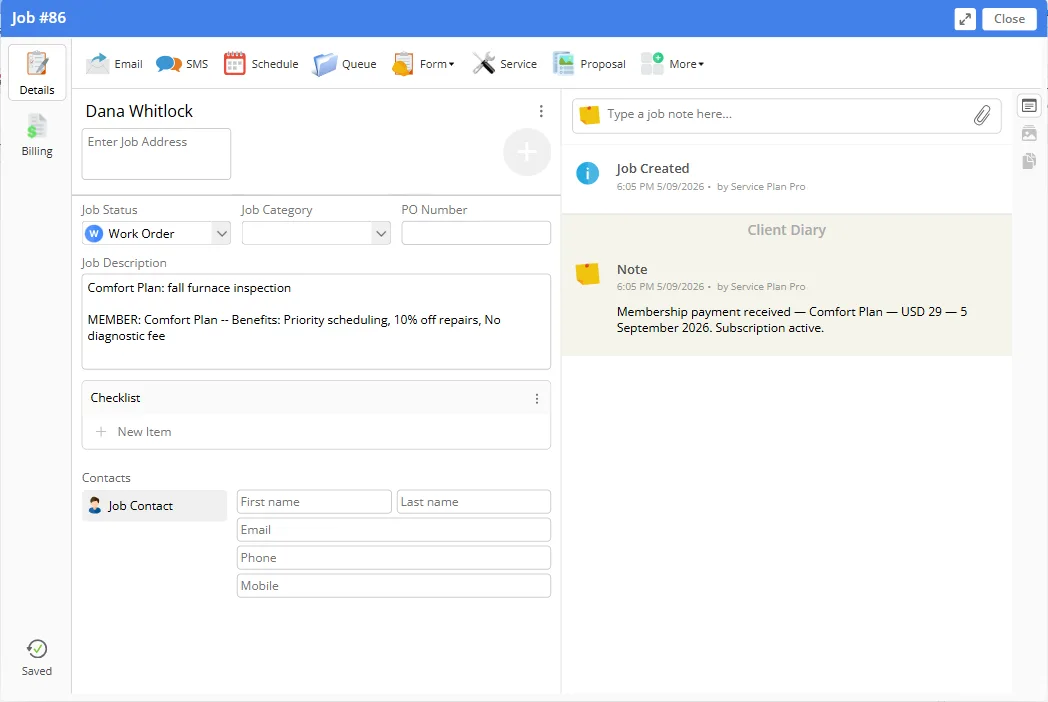
Every time a customer's subscription payment is successfully collected, Service Plan Pro adds a note to the client's diary in ServiceM8. The note includes the amount paid, the plan name, and the billing period. This keeps your ServiceM8 records up to date without any manual work.
What "unassigned job" means
Job cards created by Service Plan Pro are not assigned to a specific staff member. They appear as unassigned in ServiceM8. This is intentional: the business owner or dispatcher can assign the job to the right technician based on availability, just like any other job.
How to reconnect if the SM8 connection breaks
- ●Go to Settings in your dashboard.
- ●If ServiceM8 is showing as disconnected, click "Reconnect ServiceM8".
- ●You'll be taken through the ServiceM8 OAuth flow again.
- ●Your existing data is not affected: reconnecting just refreshes the access token.
- ●ServiceM8 tokens expire after a period of inactivity. Service Plan Pro automatically refreshes them in the background, but if something goes wrong, reconnecting manually always fixes it.
Still have questions? Contact Support
QuickBooks Online
Connecting QuickBooks Online is optional. Service Plan Pro bills and collects on its own; the connector exists so that what it collected also appears in your books without re-keying.
How to connect
- ●Go to Settings and click "Set up" next to QuickBooks Online, then click "Connect to QuickBooks".
- ●You are taken to Intuit's consent page, where you sign in to Intuit, pick the QuickBooks company, and approve the connection.
- ●Back in Service Plan Pro, the page shows the company you connected. Nothing is posted yet.
Mapping your accounts
Service Plan Pro never creates accounts or tax codes in your company. You choose, from your own chart of accounts, where each thing goes:
- ●Income account: where plan revenue is recorded.
- ●Stripe clearing account: where card payments land at their gross amount until the payout arrives.
- ●Stripe fees account: the expense account for Stripe's fees.
- ●Bank account: the account your Stripe payouts, and any bank-transfer payments you mark as paid, are deposited into.
- ●Service item: the product or service line used on every invoice.
- ●Tax code: the code applied to taxed lines.
- ●Zero-rate code: the code applied to untaxed lines, in companies outside the US.
Nothing posts until the mapping is saved and you click “Save and turn posting on”. If anything is missing, the page lists it and refuses to turn posting on. You can turn posting off again at any time.
What gets posted
- ●Every invoice paid after you connected is posted as a QuickBooks invoice, with the customer matched to an existing QuickBooks customer by email or name before one is created.
- ●The tax on that invoice is exactly the tax as issued on the Service Plan Pro invoice. It is never recalculated. If QuickBooks computes a different figure, the posted invoice is deleted again and the row is held as a mismatch.
- ●The payment that settled the invoice is posted against it: into the Stripe clearing account for a card payment, or into your bank account for a payment you marked as paid by bank transfer.
- ●With Undeposited Funds as the clearing account, a Stripe payout made up only of payments for invoices posted here is posted as one bank deposit, dated on the payout. The payments sit inside it at their full amounts, Stripe's fees are a separate line, and the total is the amount that reached your bank. A payout that holds a refund, dispute or adjustment is not posted; it is listed on the QuickBooks settings page for you to enter by hand.
- ●Posting runs once a day. "Post now" on the QuickBooks settings page runs it immediately.
What a “mismatch” row means
Service Plan Pro reads each invoice back after posting it and compares the total and the tax with the figures on its own invoice. If they differ, it deletes the QuickBooks invoice it just created, records the row as a mismatch with both sets of figures, and leaves your books untouched. The usual cause is a tax code in QuickBooks whose rate does not match the rate the invoice was issued at. The row stays held for you to look at; it is not retried automatically.
Deferred revenue
Off by default. If you turn it on and choose a liability account, an invoice covering 60 days or more is posted as deferred revenue on its date and recognised month by month across the period it covers. Monthly plans are never deferred. Talk to your accountant before turning this on.
Disconnecting
“Disconnect” on the QuickBooks settings page revokes the connection at Intuit and clears it from Service Plan Pro. Nothing already posted to QuickBooks is changed.
Still have questions? Contact Support
Billing & Payments
How Stripe processes customer payments
Service Plan Pro uses Stripe to handle recurring billing for Billing Only and Billing + Visits plans. When a customer on one of these plans enrolls and signs their agreement, a Stripe subscription is created. Stripe charges the customer's saved payment method on each renewal date and sends a receipt automatically.
For Recurring Invoice plans, no Stripe subscription is created. Instead, Service Plan Pro sends invoice emails on a schedule. These invoices can optionally include a Stripe Pay Now link, but the customer is never automatically charged. Payment is manual or via the one-off link.
For the overview of how these three plan types add up to recurring billing for service agreements without any field service software, see that page. This section is the mechanism.
Tax
Under Settings → Business you set one tax name (VAT, GST, HST, or Sales Tax), one rate, your tax registration number, and whether your plan prices already include tax. Service Plan Pro applies that one rate to everything it bills. It does not work out which tax applies in which jurisdiction; that decision is yours. A plan can carry its own rate if it differs from your default.
Recurring invoices itemise the tax: a subtotal, a tax line showing your tax name and rate, and the total due, with your registration number under your business name. The heading reads “Tax Invoice” only when a rate is set; otherwise it reads “Invoice”.
For Billing Only and Billing + Visits plans, the same rate is mirrored onto the Stripe subscription, so card charges collect it too.
Changing the rate does not change existing customers on its own. A Recurring Invoice customer's payment link keeps the rate it was created with, and their invoices keep going out at that rate, until you re-issue the link from Settings → Invoices or the customer re-enrols. Existing card-billed subscriptions keep their old rate until you apply the current one from the same page. While any customer is still on an old rate, the dashboard shows a banner pointing you to Settings → Invoices.
What happens when a payment fails
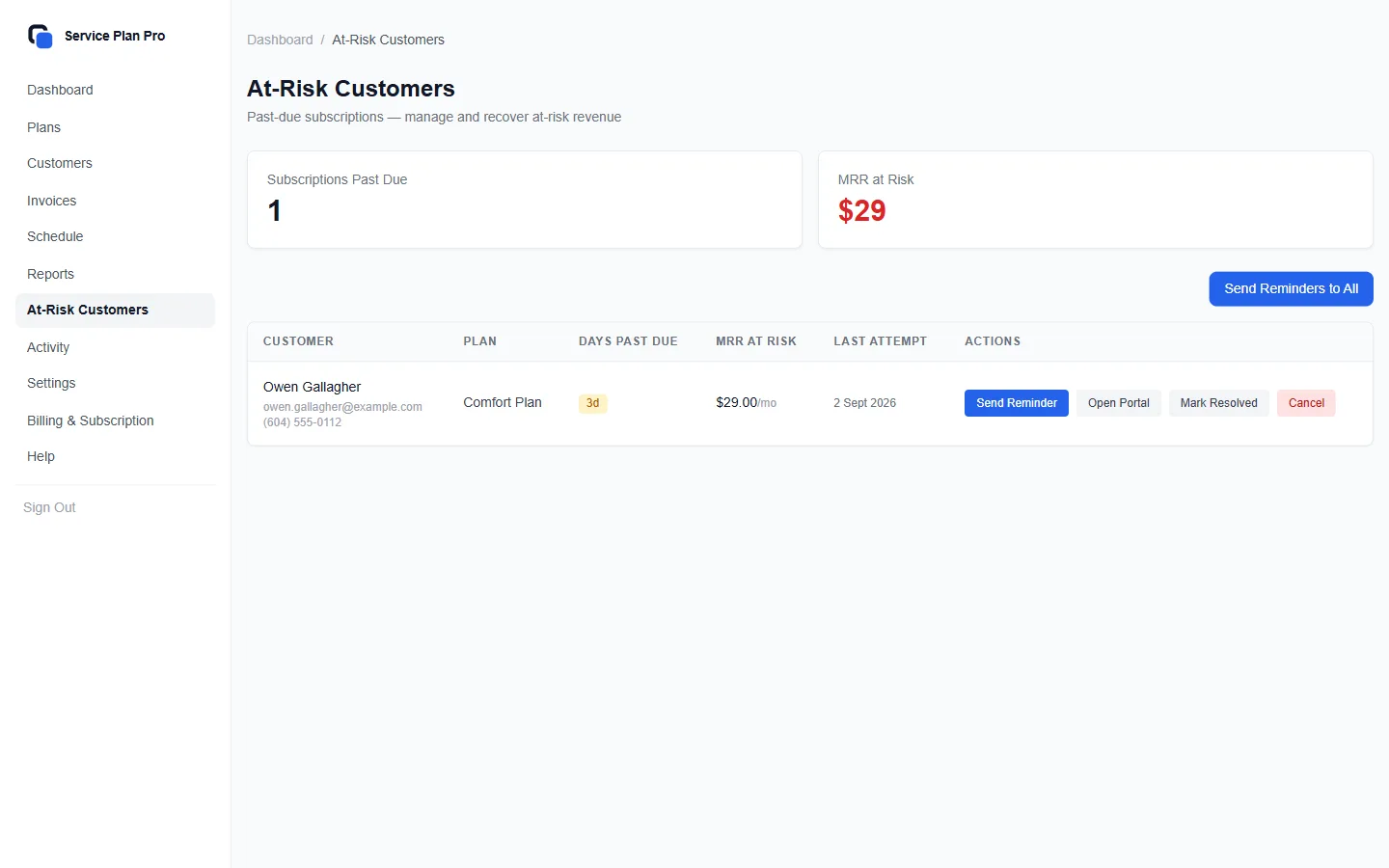
- ●Stripe retries the charge automatically (typically 3 times over several days).
- ●The customer receives an email asking them to update their payment method via the customer portal.
- ●The subscription moves to "past due" status in your dashboard.
- ●If all retries fail, the subscription is cancelled and you are notified.
- ●You can view all past-due subscriptions in Dashboard → At-Risk Customers.
How to handle a cancelled subscription
- ●Go to Customers, find the customer, and open their subscription.
- ●Click "Cancel Subscription". This stops future billing but keeps all history.
- ●The customer receives a cancellation confirmation email.
- ●Their data (plan history, agreements, visit records) is preserved indefinitely.
- ●You can re-enrol them in any plan at any time.
How to upgrade or downgrade your Service Plan Pro tier
- ●Go to Settings → Billing in your dashboard.
- ●Click "Change Plan" to see available tiers.
- ●Upgrades take effect immediately. Downgrades take effect at the next billing cycle.
- ●If you downgrade to a tier that has a lower subscription limit and you are over that limit, existing subscriptions are not affected, but you won't be able to add new ones until you're under the limit.
Still have questions? Contact Support
FAQ
Do I need ServiceM8?
- ●No. Service Plan Pro sells and bills service agreements on its own: plans, enrolment, card billing through Stripe, recurring invoices, signed agreements, and a visit schedule.
- ●ServiceM8 is an optional connector. Connect it and Service Plan Pro will also create job cards for scheduled visits, sync your client list, and log payment notes to client diaries.
What happens to visits if I don't use a job app?
- ●Plans that include visits generate their schedule automatically. Each visit appears on the Schedule page in your dashboard, and you mark it complete once it is done.
- ●You can download the schedule as a calendar (.ics) file for Google Calendar, Apple Calendar, or Outlook.
- ●Every morning at 09:00 in your business timezone you get an email listing tomorrow's visits. Customers get their own visit reminders.
My ServiceM8 jobs aren't being created. What do I check?
- ●Job cards are only created when ServiceM8 is connected. Without it, visits still appear on the Schedule page in your dashboard.
- ●Check that ServiceM8 is connected: go to Settings and confirm the connection is active. If it shows "Disconnected", click Reconnect.
- ●Job cards are only created for Billing + Visits plans. If your customers are on a Billing Only or Recurring Invoice plan, no job cards are created automatically.
- ●The visit schedule is calculated from the enrollment date. If a customer enrolled recently, their first job card may not be due yet.
- ●Check the Schedule page in your dashboard to see when the next visits are due.
A customer says they didn't receive their agreement: what do I do?
- ●Ask the customer to check their spam/junk folder.
- ●Go to Customers → find the customer → open their profile. The Agreement box has Resend, which emails a fresh link, and Copy link, if you would rather send it yourself.
- ●Make sure the customer's email address is correct. If it needs updating, edit their profile and then resend.
- ●If the customer still can't receive emails, contact support and we can generate a direct signing link for them.
How do I cancel a customer's plan without losing their history?
- ●Open the customer's page. On a card plan, click "Cancel at period end": they keep the plan until the period they have paid for ends. On a Recurring Invoice plan, click "Cancel subscription" and confirm: no more invoices are sent. ("Pause invoices" stops them for a while instead.)
- ●This stops future billing and marks the subscription as cancelled, but all visit history, agreements, and payment records are kept permanently. Invoices already sent stay open until they are paid or voided.
- ●You can re-enrol the customer in a new plan at any time. Their history will still be there.
Can I have multiple plan types at once?
- ●Yes. You can create as many plans as you like, a mix of Billing Only, Billing + Visits, and Recurring Invoice plans in any combination.
- ●Customers can only be enrolled in one active plan at a time, but you can transfer them to a different plan if needed.
A customer wants to pay by bank transfer. Can I still use Service Plan Pro?
- ●Yes. Create a Recurring Invoice plan for that customer. Service Plan Pro will send them a branded invoice on schedule.
- ●They pay however they normally would: bank transfer, cash, cheque, and you mark the invoice as paid in your dashboard.
- ●If they ever want to pay by card, each invoice includes an optional Pay Now link they can use without being locked into automatic charges.
Does Service Plan Pro replace my bookkeeper?
- ●No. With QuickBooks Online connected, Service Plan Pro posts paid invoices, their payments and your Stripe payouts into the accounts you chose, so nobody re-keys them.
- ●It does not decide which tax applies, does not post refunds, credits, or voided invoices, and does not close periods or match your bank feed for you.
- ●Rows it cannot post safely are held for a person to look at. Your bookkeeper still reviews the books.
What happens to my customers' data if I cancel Service Plan Pro?
- ●Your data is never automatically deleted.
- ●If your subscription lapses, your dashboard access is suspended but all data is retained for 90 days.
- ●You can export your customers as CSV at any time: on the Customers page, tick the customers you want (the box at the top of the list ticks them all), and Export CSV appears in the bar with Enroll in Plan and More Actions. If your account has lapsed, the page you are sent to has a download of your customers and subscriptions.
- ●If you need your data after an account suspension, contact support.
Still have questions? Contact Support